
Study Hamlet › Exam planner
A free exam study planner that does the scheduling for you
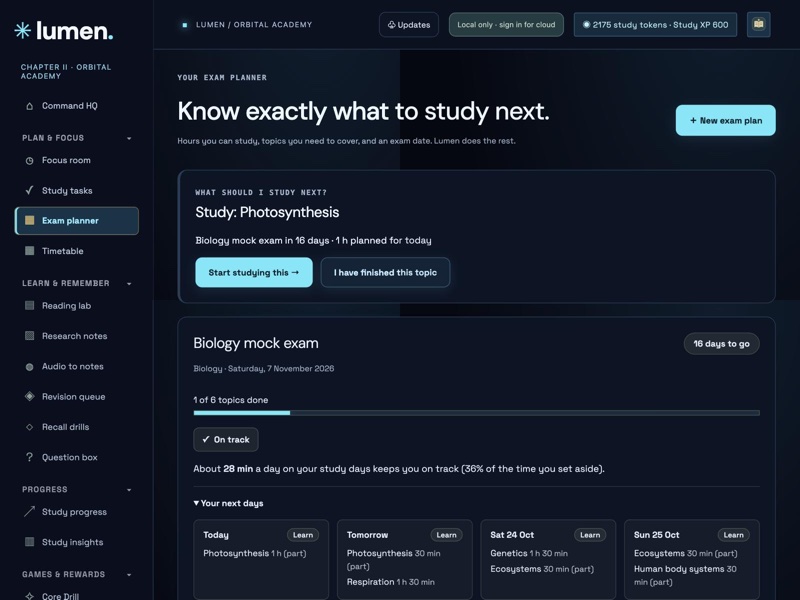
Tell Study Hamlet when your exam is, how many hours you can study each day and which topics you need to cover. It spreads the work over the days you have, tells you what to study next, and adjusts the plan when you fall behind.
Try the exam planner ↗Free · no ads · no account needed
How it works
Add your exam
Give the plan a name, the exam date and the hours you can study on each day of the week. Rest days are just days with zero hours.
List your topics
Add topics one by one or paste a list. Mark each as easy, medium or hard so the hardest ones are learned first and revised most.
Follow “what should I study next?”
Study Hamlet shows today’s topic and how long to spend on it. Tick a topic when it is done, or start a focus session straight from the plan.
Stay on track
If you miss a day the remaining topics are spread over the days left, and you see a clear warning if there is no longer enough time.
What you get
- Works backwards from the exam date, with 0 to 14 buffer days kept for revision at the end
- Splits long topics over several days instead of overloading one
- Warns you early when the hours you have are not enough for the topics you listed
- Up to eight plans at once, so you can prepare for several subjects
- Plans are saved in your journal, so they back up and sync with the rest of your notes if you sign in
- No account needed: everything stays on your device unless you choose to sign in
Questions
How does the exam planner decide what to study each day?
It counts the days left before your exam, keeps your chosen buffer days for revision, and fills each study day up to the hours you set. Harder topics are scheduled earlier and are revised again near the end.
What happens if I miss a day?
Study Hamlet re-plans from today. The topics you have not finished are spread over the days that remain, and the plan tells you if the time left is no longer enough.
Can I plan more than one exam?
Yes. You can keep up to eight plans, each with its own date, weekly hours and topic list.
Do I need an account?
No. The planner works without an account and saves on your device. Signing in only adds cloud backup and use on other devices.